All settings live in Editor Preferences → Plugins → TakeForge - reachable
from TakeForge → Settings... on the main menu bar - and are
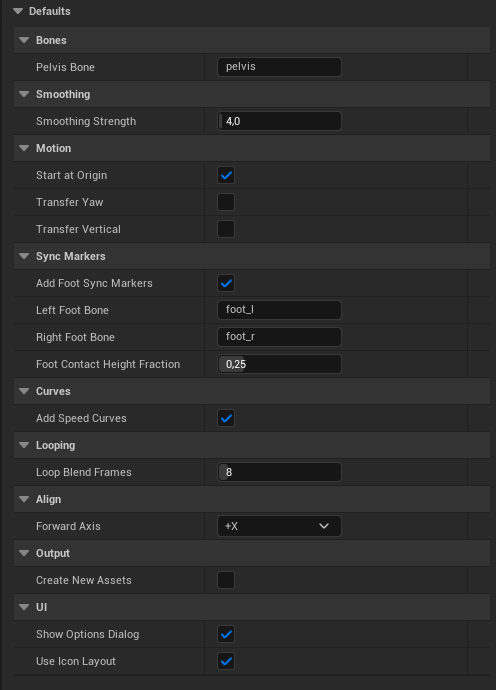
also shown in the pre-action options dialog (and in the panel's Defaults
section, pictured). They persist per project, per user.
Bones
| Setting | Default | Description |
|---|
| Pelvis Bone | pelvis | Bone whose travel is transferred to the root. When the skeleton has no bone by this name, auto-detection takes over: exact names (pelvis, hips, hip, mixamorig:hips), then the first bone with 3+ children (spine + two legs). None skips straight to auto-detection. |
The root is always the skeleton's bone 0 - on UE5/MetaHuman skeletons,
root.
Smoothing
| Setting | Default | Description |
|---|
| Smoothing Strength | 4.0 | Gaussian sigma in frames used by Smoothed Root Motion and In Place. ~2 removes jitter, ~4 removes hip sway, 8+ approaches a straight path. Range 0.5–60. |
Motion
| Setting | Default | Description |
|---|
| Start At Origin | on | Subtract the first-frame offset so the root path begins at (0,0). |
| Transfer Yaw | off | Character turning (rotation about the up axis) also moves to the root. Enable for turn animations with root motion. |
| Transfer Vertical | off | Vertical pelvis motion moves to the root. Leave off for ground locomotion (it would pump pelvis bob into the capsule); turn on for jumps, ladders and climbs, where the height is the motion. |
Sync Markers
| Setting | Default | Description |
|---|
| Add Foot Sync Markers | on | Place markers at heel strikes on a FootSync notify track. |
| Left / Right Foot Bone | foot_l / foot_r | Foot bones. A name the skeleton lacks falls back to auto-detection (UE5/MetaHuman, generic, and Mixamo names), so the defaults work on any rig. |
| Left / Right Foot Marker Name | foot_l / foot_r | What each marker is called. Sync groups and distance matching pair markers up by name, so this has to match what the rest of your setup expects. |
| Add Foot Contact Curves | off | Also write per-frame contact curves - 1 while the foot is planted, 0 while airborne. For motion matching and foot planting, which sample the pose rather than listen for events. |
| Left / Right Foot Contact Curve Name | contact_l / contact_r | What each contact curve is called. Epic's Game Animation Sample reads these names. |
| Foot Contact Height Fraction | 0.25 | A foot counts as planted while within this fraction of its vertical range above its lowest point. Range 0.05–0.9. |
Retarget
Cleanup run on retargeted takes as part of the same action - see
Then run.
| Setting | Default | Description |
|---|
| Retarget Fix Track Order | on | Rewrite bone tracks in hierarchy order; retarget output is a classic source of out-of-order tracks. |
| Retarget Add Sync Markers | on | Re-detect foot plants on the new rig, since proportions move them. |
| Retarget Foot Lock | on | Foot Lock with whole-take ground snap - retargeting onto different proportions is what makes feet slide and float. |
| Retarget Sync IK Bones | on | Bake the ik_foot_* and ik_hand_* bones to follow the real ones. Runs last, after Foot Lock. |
Curves
| Setting | Default | Description |
|---|
| Add Speed Curves | on | Write RootMotion_Speed (cm/s) and RootMotion_Distance (cm) float curves to outputs. |
Motion Matching
Names for the curves Add Motion Matching Curves
writes. The graph samples curves by name, so these have to match what your
Animation Blueprint and choosers read.
| Setting | Default | Description |
|---|
| Enable Warping Curve Name | enable_warping | Written flat at 1 or 0 - the action asks which. |
| Speed Data Curve Name | movedata_speed | Travel speed in cm/s at every frame, or one constant value. |
| Phase Curve Name | phase | Gait phase, 0-1, wrapping at each left-foot strike. |
Looping
| Setting | Default | Description |
|---|
| Loop Blend Frames | 8 | Frames at the clip end blended into the first-frame pose by Make Loopable. Range 2–60 (clamped to a third of the clip). |
Align
| Setting | Default | Description |
|---|
| Forward Axis | +X | Axis the net travel is rotated onto by Align Travel Direction. |
Output
| Setting | Default | Description |
|---|
| Create New Assets | on | Create a suffixed copy per action (non-destructive). Uncheck to rewrite the selected asset directly (undoable in-session). Trim and Retime additionally offer this per invocation; Split always creates new assets. |
| Setting | Default | Description |
|---|
| Show Options Dialog | on | Confirm before each action: menus show the settings dialog, panel actions without their own options confirm inline (targets + defaults). Uncheck for immediate runs with saved settings. |
| Use Icon Layout | on | Panel sections as a compact icon grid (hover for the full description, click for the inline details). Uncheck for the full-text list; the button beside the panel's search box toggles it too. |
Output suffixes
| Action | Suffix |
|---|
| Exact Root Motion | _RootMotion |
| Smoothed Root Motion | _RootMotionSmooth |
| In Place | _InPlace |
| Make Loopable | _Loop |
| Align Travel Direction | _Aligned |
| Trim to Range | _Trim (+ _Head / _Tail with Save Removed Parts) |
| Split into Segments | _Seg1, _Seg2, … |
| Adjust Motion | _Adjusted |
| Retime to Speed | _Retimed |
Name collisions get an automatic numeric suffix - existing assets are never
overwritten by the create-new path.