Retarget Takes
Retarget the selected takes onto another skeleton - without the second window. Unreal does the retargeting; TakeForge removes the ceremony around it and can clean up the output in the same pass.
Panel: Retarget → Retarget. Context menu: TakeForge → Retarget Takes...
Why it exists
Unreal's Retarget Animations window discards the thing you just told it. You right-click the take you want, and the dialog opens with an unsorted list of every animation on that skeleton, asking you to find yours again - then re-pick the target and the destination, every single time.
| Unreal's flow | TakeForge |
|---|---|
| Find your take again in a list of everything on the skeleton | Gone - your selection is the input, one take or fifty |
| Re-pick the target each run | Remembered, pre-filled |
| Re-pick the destination each run | Remembered, or beside the source |
| Output still needs cleaning up | Optional cleanup runs on it immediately |
After the first run it is: select → right-click → Retarget → Apply.
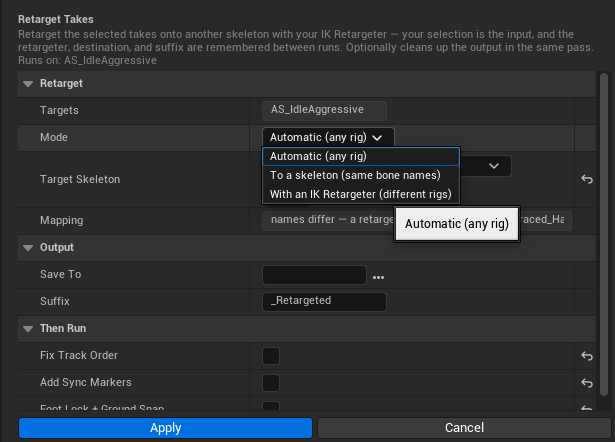
Automatic (the default)
Pick a target skeleton and press Apply. Automatic works out the mechanism from the rigs themselves:
- rigs that share bone names get a direct name-based retarget, which is cheaper and keeps every track exactly as it was
- rigs that don't get an IK Retargeter generated for them on the fly, so a Mixamo take retargets onto a UE5 rig without you authoring anything
This is what Unreal's own Retarget Animation Assets window does. Despite appearances it is not the UE4 name-based dialog: it ships in the IK Rig plugin, and it procedurally builds both IK Rigs and the retargeter between them by auto-characterizing the two meshes. Bone names never enter into it, which is why it retargets rigs that share almost none.
The generated rigs are transient - retargeting a library does not leave a rig pair per run behind in your Content Browser.
Auto-characterization matches against known hierarchies (UE4 and UE5 mannequins, Mixamo, MetaHuman and friends). A bespoke creature rig that matches no template is refused with the closest template and its score, so you know how far off it was - author an IK Retargeter for that pair and use With an IK Retargeter mode instead.
It also reads a skeletal mesh, not just the skeleton: proportions are part of the characterization. If a skeleton has no preview mesh set, you'll be told which one to fix.
Forcing a mechanism
The other two modes exist for when you want to be explicit.
To a skeleton (same bone names)
Duplicates each take and re-points the copy at another skeleton, matching bones by name, with a component-space conversion so differing proportions still work. There is no IK Retargeter involved and none is created, which is exactly why it only works between rigs that already share bone names.
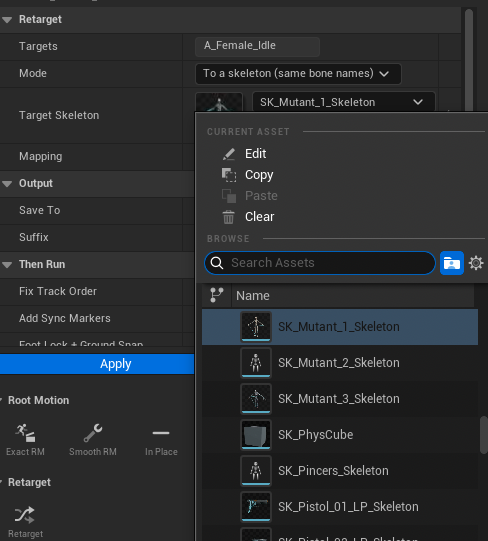
The Mapping line reports how many of the source's bone names exist on the target, so an incompatible pair is visible before you commit. Below 50% the retarget is refused and points you at the other mode.
With an IK Retargeter (different rigs)
Chain-mapped retargeting for rigs that genuinely differ - Mixamo to MetaHuman, or any pair whose bone names don't line up. This needs an IK Retargeter asset for the pair, which holds the two IK Rigs and the chain mapping between them. Author it once in Unreal's IK Retargeter editor; after that it is a remembered dropdown here.
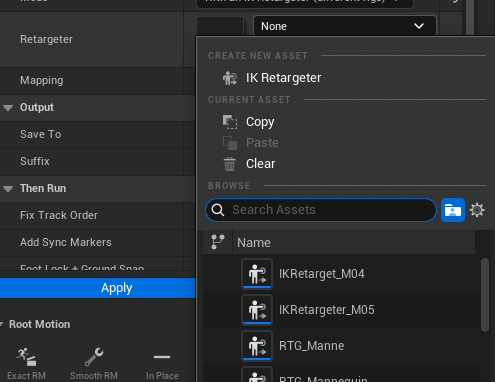
Both skeletal meshes are read from the retargeter, so this mode never asks for meshes or skeletons - picking the retargeter already decided what maps onto what.
Options
| Option | Meaning |
|---|---|
| Targets | Read-only: your Content Browser selection |
| Mode | Which mechanism to use (see above). Remembered |
| Target Skeleton | Automatic and Skeleton modes: what to retarget onto. Remembered |
| Retargeter | IK mode: the retargeter for this rig pair. Remembered |
| Mapping | Read-only: what maps onto what, plus the bone-name match in skeleton mode |
| Save To | Destination folder - empty writes each take beside its source. Remembered |
| Suffix | Appended to each name (default _Retargeted). Remembered |
Then run
Retargeted takes are exactly the ones that come out needing repair, so the cleanup is part of the same action instead of something to remember later:
| Step | Why it's on by default |
|---|---|
| Fix Track Order | Retarget output is a classic source of out-of-order bone tracks, which silently destroy root motion after compression |
| Add Sync Markers | Foot plants move when proportions change, so the markers are re-detected on the new rig |
| Foot Lock + Ground Snap | Retargeting onto different proportions is the cause of sliding and floating feet - Foot Lock fixes both |
| Sync IK Bones | A source rig without ik_foot_* bones leaves the target's parked at the reference pose, which drags the legs in game while the clip previews fine. Runs last, so the IK bones follow the feet where Foot Lock left them |
Takes that aren't on the expected source skeleton are refused by name rather than silently mangled; select a mixed batch and only the matching ones are processed, with the rest reported as skipped.
Scripting:
takes = [unreal.load_asset('/Game/Anims/A_Female_Idle')]

# automatic - pass a skeleton and no retargeter; the mapping is worked out
skel = unreal.load_asset('/Game/Chars/SK_Mutant_1_Skeleton')
ok, created, err = unreal.TakeForgeLibrary.retarget_takes(
    takes, skel, None, '_Retargeted', '')      # empty path = beside the source

# IK mode - pass a retargeter instead
rtg = unreal.load_asset('/Game/Rigs/RTG_UE4Manny_UE5Manny')
ok, created, err = unreal.TakeForgeLibrary.retarget_takes(
    takes, None, rtg, '_UE5', '/Game/Anims/Retargeted')

for seq in created:                             # chain the cleanup yourself
    unreal.TakeForgeLibrary.normalize_track_order(seq)
    unreal.TakeForgeLibrary.foot_lock(seq, True, True, 3.0, 30.0, ground_snap=1)
Known issues
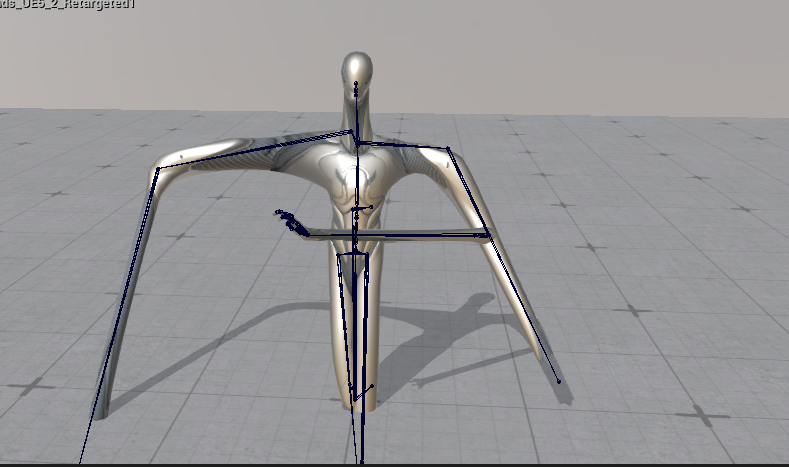
A freshly retargeted take previews stretched
A retargeted asset can appear with its limbs stretched away from the body until it has been saved:
Save the asset and it resolves:
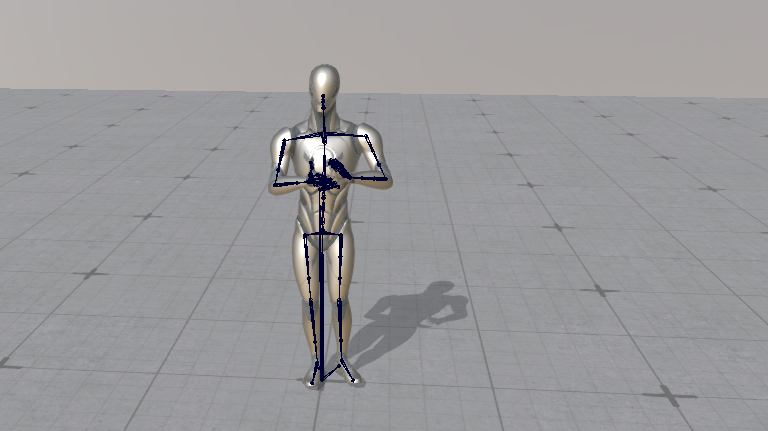
The animation data is correct the whole time. This is the editor previewing an unsaved asset from state that has not been fully built yet - pressing play, or saving, makes it re-evaluate and the take snaps to normal. Nothing about the saved asset, or what a montage or the capsule receives at runtime, is affected.
If you want to confirm the data rather than trust the viewport, run Check Take on it: travel, foot plants and ground contact are all reported from the animation data itself, not from the preview.
Unreal's name-based retarget implementation reaches into Slate, so Skeleton
mode cannot run in a commandlet - a headless script gets a clear error instead
of a crash. Automatic and IK Retargeter modes are headless-safe: Automatic
falls back to the generated retargeter when there is no Slate, so batch jobs
(-run=pythonscript) work without picking a mode at all.