Check Take
A read-only report on any Animation Sequence - see what the tool sees before committing to processing. No assets are modified.
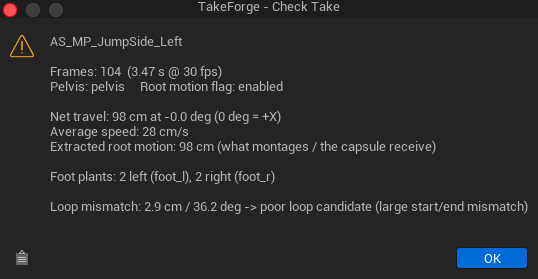
The report also includes a ground contact line - how far the planted feet sit above or below the floor, and over how many contact windows. Feet that float or sink are invisible in the viewport at a glance but obvious here; Foot Lock's ground snap is the fix.
The report
Walk_Take3

Frames: 420  (14.00 s @ 30 fps)
Pelvis: pelvis     Root motion flag: disabled

Net travel: 640 cm at 4.3 deg (0 deg = +X)
Average speed: 46 cm/s

Foot plants: 11 left (foot_l), 11 right (foot_r)

Loop mismatch: 3.2 cm / 6.1 deg -> close - run Make Loopable
Line by line:
| Line | What it tells you |
|---|---|
| Frames / duration / fps | Sanity-check the import; spot wrong-fps imports immediately |
| Pelvis / root motion flag | Which bone the tool will read, and whether Enable Root Motion is currently set |
| Net travel + direction | How far the take moves and how far off-axis it is - a direction well away from 0° (or 90° for +Y rigs) means you want Align Travel Direction |
| Average speed | Walk vs jog vs run at a glance; feeds naming and blendspace placement |
| Foot plants | Detected heel strikes per side with the resolved bone names - if counts look wrong, tune Foot Contact Height Fraction before processing |
| Loop mismatch + verdict | Worst start-vs-end pose difference across all bones (root excluded) |
Loop verdicts
| Verdict | Meaning |
|---|---|
| loops cleanly as-is | < 1 cm / 2° mismatch - cycling already works |
| close - run Make Loopable | < 8 cm / 15° - the default blend window will absorb it |
| poor loop candidate | Large mismatch - trim to a better cycle first, or accept a visible correction |
Batch behavior
On a multi-selection, reports are shown for the first 3 assets (one dialog
each) to avoid a popup storm. For auditing whole folders, use the
scripting API - GetAverageSpeed and friends -
and print your own table.