Stitch Takes
Append one take after another with a baked crossfaded transition - the
idle flows into the dash in a single asset, instead of relying on a
state-machine crossfade at runtime. Output suffix: *_Stitched.
How it works
- Crossfade, not a cut: the target's last Blend Frames overlap the
follow-up's beginning and blend with a smoothstep ramp - pose and
velocities stay continuous through the seam.
0gives a hard cut. - Root motion continues: the follow-up's root is re-based (planar position + yaw) so its travel picks up exactly where the target ends - no teleporting back to the origin. Height and tilt stay the follow-up's own, so jumps and slopes survive.
- Everything comes along: the follow-up's notifies,
foot_l/foot_rsync markers, and float-curve keys are appended time-shifted; the target's own stay put. Different frame rates are fine - the follow-up is resampled to the target's rate. - Root motion enablement propagates: stitching a root-motion take after an idle enables Enable Root Motion on the result (the travel would otherwise be baked in the root track but never extracted at runtime). The notification says when this happened.
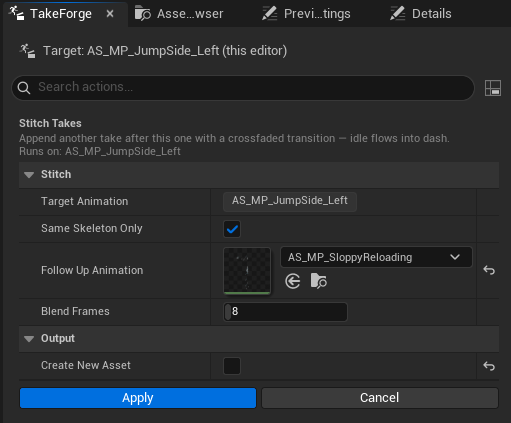
Options
| Option | Meaning |
|---|---|
| Target Animation | What the follow-up gets appended to - your selection (read-only) |
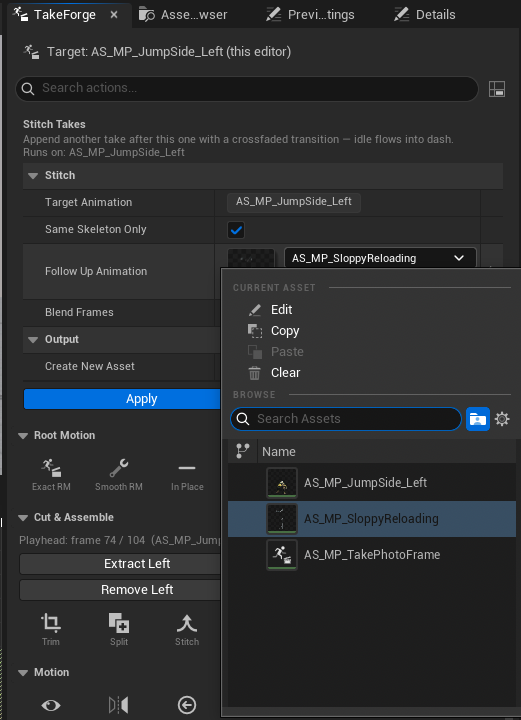
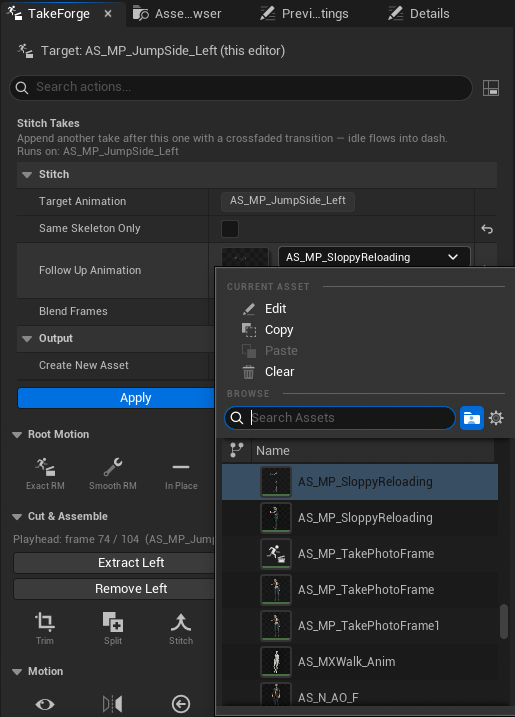
| Same Skeleton Only | Filters the picker to takes on the target's exact skeleton (default on). Uncheck to browse everything |
| Follow-Up Animation | The take that plays after |
| Blend Frames | Crossfade length (default 8; 0 = hard cut) |
| Create New Asset | New *_Stitched copy (default) or in-place rewrite |
Want to stitch only parts of takes? Trim the pieces first - Stitch deliberately takes whole clips so each tool stays simple.
Stitch the result again to build longer sequences (idle → dash → recover → idle), then Make Loopable if the chain should cycle.
Stitching a take onto itself works too (pick the same animation as the follow-up, or run in place): the clip is doubled with a crossfaded seam and its root motion continues - a quick way to extend a short idle or repeat a walk stretch before looping it.
Cross-skeleton: the follow-up may live on a different skeleton asset as long as the rigs match by bone name (uncheck Same Skeleton Only to pick one) - at least half of its tracks must match or the stitch refuses and points you at the IK Retargeter. Translations are scaled by the rigs' size ratio so stride lengths survive; the result note reports the ratio.
Same Skeleton Only on - the picker shows only this rig's takes:
Off - everything, including same-named retargets on other rigs:
Scripting:
ok, err = unreal.TakeForgeLibrary.stitch_takes(idle_seq, dash_seq, blend_frames=8.0)