Smooth Bones
Targeted jitter cleanup: Gaussian-smooth the movement of chosen skeleton
branches - across the whole clip, or only inside given frame windows. Output
suffix: *_Smoothed.
Markerless mocap loves to put high-frequency noise on wrists, fingers, and heads while the rest of the take is fine. Smooth Bones lets you calm exactly that limb, exactly where it misbehaves, without softening the whole performance.
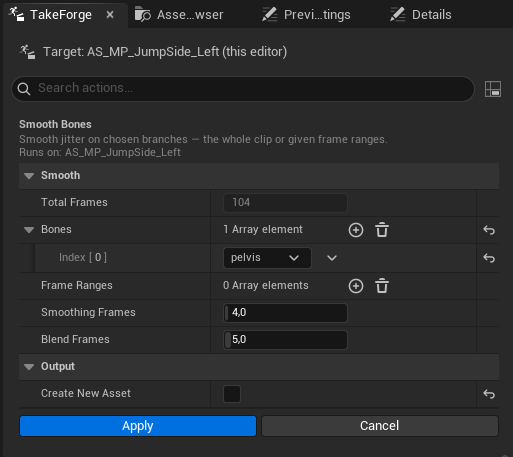
Options
| Option | Meaning |
|---|---|
| Bones | Branches to smooth - each entry affects the bone and everything beneath it |
| Frame Ranges | [Start, End] windows (inclusive) to smooth. Leave empty to smooth the whole clip. Overlapping windows merge |
| Smoothing Frames | Gaussian radius in frames - higher smooths harder (default 4) |
| Blend Frames | The effect fades in/out over this many frames outside each window edge, so nothing pops at the boundary (default 5) |
| Create New Asset | New *_Smoothed copy (default) or in-place rewrite |
How it smooths
- The same zero-phase Gaussian used for smoothed root motion: no lag, no drift, and clip endpoints are reflection-padded instead of flattened.
- Rotations are smoothed on hemisphere-aligned quaternion components and renormalized; translations per axis. Scale, float curves, notifies, and markers are untouched.
- Inside a window the smoothed pose is blended toward the original per frame (lerp/slerp), so a window boundary can never introduce a discontinuity - worst case the smoothing just fades out.
Finding the window
Scrub the take in the Animation Editor - the panel's Cut & Assemble section shows the playhead frame live (Playhead: frame 56 / 104). Note where the jitter starts and ends, type those frames into a range, and run. The dialog shows the clip's total frames, and your bone selection persists between runs for iterating on strength.
Radius 3–5 removes sensor jitter while keeping intent; past ~10 the limb
starts feeling underwater. Since the default output is a new asset, A/B the
*_Smoothed copy against the original and re-run with a different radius.
Scripting:
ok, err = unreal.TakeForgeLibrary.smooth_bones(
    seq, ["hand_r"], [unreal.IntPoint(120, 180)],
    smoothing_frames=4.0, blend_frames=5.0)
# whole clip, both arms
ok, err = unreal.TakeForgeLibrary.smooth_bones(seq, ["clavicle_l", "clavicle_r"], [], 4.0, 5.0)