Foot Lock
Pin each foot in place while it is on the ground - the baked cure for foot
sliding. Smoothing, in-place conversion, retargeting, and speed changes all
leave feet drifting a few centimeters during contacts; Foot Lock detects every
ground-contact window and holds the foot at its planted position with a proper
leg IK. Output suffix: *_FootLocked.
Panel: Motion → Foot Lock. Context menu: TakeForge → Foot Lock...
How it works
- Contact detection - the same foot-height analysis as foot sync markers finds the windows where each foot is planted (foot bones and contact height fraction come from Settings).
- The pin - inside each window the foot is held at its average planted position via an analytic two-bone leg IK (thigh–calf–foot). The original knee position serves as the pole target, so the knee keeps its natural bend plane; the foot keeps its animated orientation - only its position is pinned.
- Feathering - the lock fades in and out over Blend Frames inside each window, so touchdown and lift-off stay soft.
- Safety rail - corrections larger than Max Correction are clamped, so a detection glitch can never yank a leg.
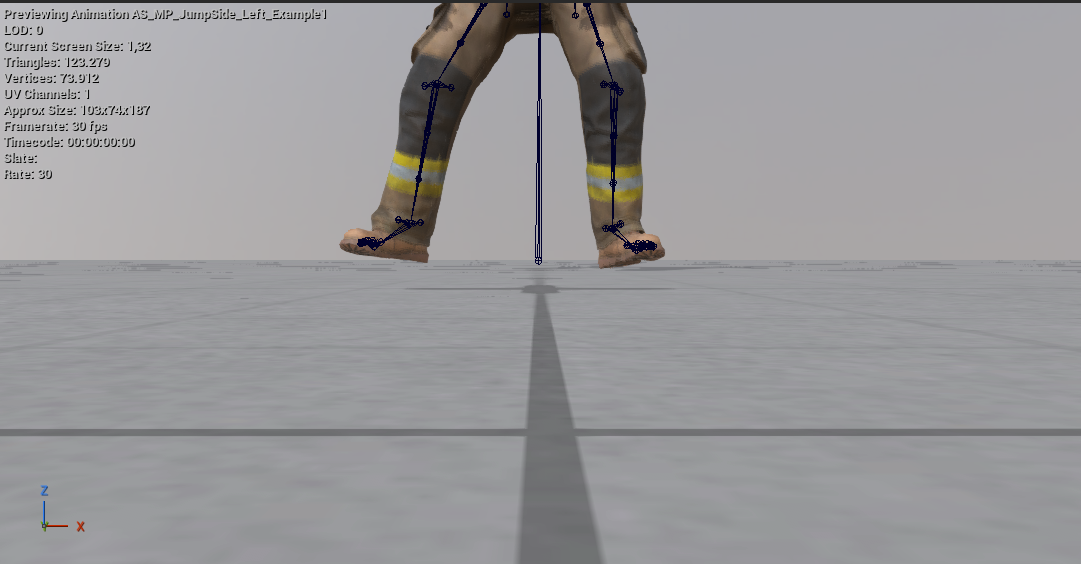
Ground snap - putting the feet on the floor
Sliding and floating are two different defects, and a take can have either without the other. Locking stops a planted foot from drifting; it does not care how high that foot is. Ground snap is the other half.
Before - the solve hovers the whole character above the floor:
After - the same take, feet planted:
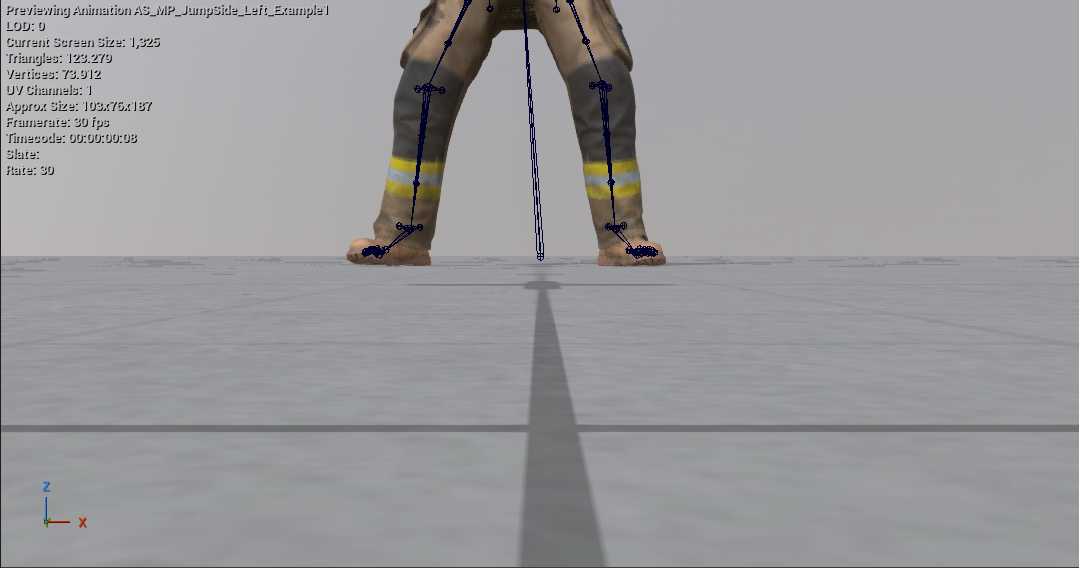
It has to be a separate control because contact detection cannot see the problem: plants are found from the bottom fraction of each foot's own vertical range, which is what makes detection work on any rig without configuration - and also means a take whose feet float 3 cm produces perfectly correct contact windows. The detector knows when, never where.
The floor comes from the reference pose instead: a rig's rest pose stands on the ground, so the ankle's rest height is exactly how high the ankle belongs when the foot is down. Comparing that against the take's actual contacts gives the float or sink in centimetres - the number shown in the dialog and in Check Take.
| Mode | What it does | When |
|---|---|---|
| Off | Lock only | The feet are already on the floor |
| Whole take | One constant shift of the root moves the character onto the floor | The usual case: a systematic offset. Deforms nothing - the pose is untouched, and a constant shift changes no root-motion delta |
| Per contact | Each plant is IK'd down to the floor individually | One foot sinks while the other floats. Uses the same IK and the same Max Correction rail as the lock |
Per contact refuses slopes. If the take's plants sit at heights spanning more than 15 cm, that is real terrain - stairs, a ramp, a vault - and flattening every contact onto one plane would destroy it. The tool says so and points you at Whole take instead.
Level soles additionally flattens the sole against the floor during contact, keeping the foot's animated yaw - for solves that plant the foot tilted.
Ground Offset moves that floor, in both modes. The snap targets reference floor + offset - not the feet's current height plus the offset - so it is a destination, not a step. Running the same snap again finds the feet already there and changes nothing, which is correct. For feet 10 cm lower, set −10 once; applying −5 twice still ends at −5. (Before 1.24, whole-take snapping ignored the offset and always landed on the reference floor.)
Options
| Option | Meaning |
|---|---|
| Detected | Read-only: contact windows found per foot |
| Lock Left / Lock Right | Pin each foot independently |
| Blend Frames | Fade of the lock inside each window's edges (default 3) |
| Max Correction | Largest IK correction allowed, in cm (default 30) |
| Measured | Read-only: how far the planted feet sit above or below the floor right now |
| Ground Snap | Off / Whole take / Per contact (see above) |
| Ground Offset | Where the floor sits relative to the reference floor, in cm - negative presses the feet further down. A destination, not a step (see above) |
| Level Soles | Flatten the sole against the floor during contact |
| Create New Asset | New *_FootLocked copy (default) or in-place rewrite |
Locking and snapping are independent: you can snap without locking (leave both Lock boxes unchecked) or lock without snapping.
Run Foot Lock last - after smoothing, in-place conversion, speed ramps, or retiming - since each of those can (re)introduce slide. Then add foot sync markers so blendspaces stay phase-aligned.
Check Take reports the ground contact for any take, so you can tell a floating library from a sliding one before touching either.
Scripting:
ok, err = unreal.TakeForgeLibrary.foot_lock(
    seq, lock_left=True, lock_right=True, blend_frames=3.0, max_correction_cm=30.0)

# lock, and shift the whole take onto the floor
ok, err = unreal.TakeForgeLibrary.foot_lock(
    seq, True, True, 3.0, 30.0, ground_snap=1)

# how far off the floor is this take?
ok, offset_cm, spread_cm, windows = unreal.TakeForgeLibrary.measure_ground_contact(seq)