Retime to Speed
Blendspaces want clips at round, planned speeds - a walk at exactly 150 cm/s, a
jog at 300, a run at 500. Mocap gives you 143.7. Retime to Speed closes
that gap. Output suffix: *_Retimed.
What it does
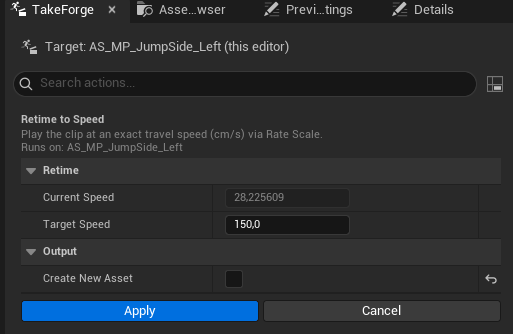
- Measures the take's true average travel speed (net pelvis displacement over duration) and shows it in the dialog as Current Speed.
- You enter the Target Speed in cm/s.
- The tool sets the asset's Rate Scale to
target / current, so the clip plays back at exactly the target speed. - If a
RootMotion_Speedcurve exists, its values are multiplied by the same factor so the curve keeps describing the actual played-back speed rather than the authored one. (RootMotion_Distanceis unchanged - the distance is the same, it's just covered faster or slower.)
The notification reports the change, e.g. "retimed 144 → 150 cm/s (RateScale 1.044)".
Why Rate Scale instead of resampling
Rate Scale is lossless and reversible - the keys are untouched, only playback timing changes. Set it back to 1.0 and you have the original take. Foot-plant timing, notifies, and curves all scale consistently with playback.
Notes
- The retime factor is clamped to a sane range (0.1×–10×); a take with no measurable travel is rejected with an error rather than retimed to nonsense.
- Batch selections retime every selected clip to the same target - the usual case ("all walks at 150"), but note that Current Speed in the dialog is measured from the first selected asset.
- Keep retiming modest: ±15% is generally invisible, ±30% starts to read as slow-motion/fast-forward on close inspection. For bigger speed gaps, capture at the intended gait instead.