Sync Markers & Curves
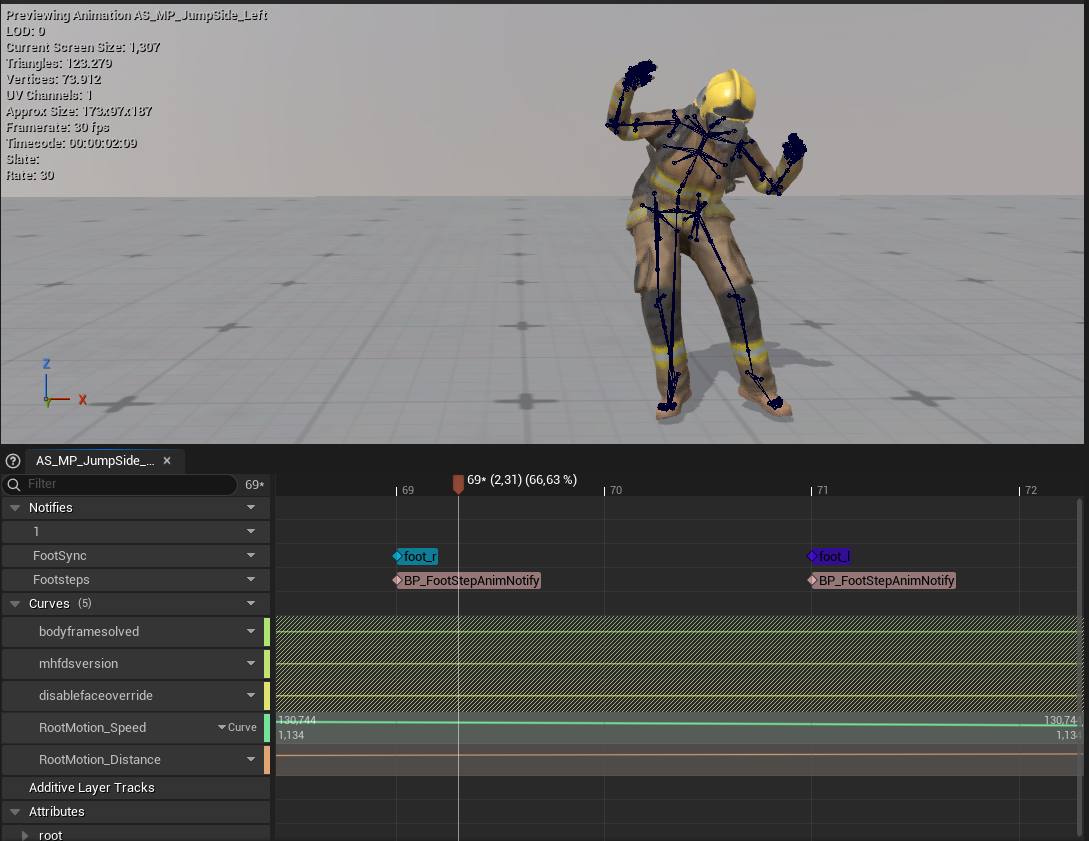
Every processed copy is enriched with the metadata a production locomotion set needs: sync markers at the foot plants, speed and distance curves, and optionally per-frame foot contact curves. Each is toggleable in Settings - markers and speed curves are on by default, contact curves are not.
Foot sync markers
One foot_l / foot_r sync marker is placed at each foot plant (heel
strike), on a notify track named FootSync (pre-1.11 builds used a track
named TakeForge; re-running any marker-placing action migrates them).
Both marker names are settings. Sync groups and distance matching pair
markers up by name, so they have to match whatever the rest of your
animation setup already expects - which is not always foot_l and foot_r.
Rename them under Sync Markers and every take you process afterwards uses
the new names.
Markers are added automatically by the root motion outputs, or on their own with Add Foot Sync Markers (panel Motion section / context menu) - just the markers, no other processing, always in place.
Looking for footstep sounds/events rather than sync markers? That's
Footstep Notifies - same detection, game-facing
notifies on a separate Footsteps track.
Why you need them
The moment two clips share a blendspace or sync group, UE uses sync markers to keep them phase-aligned - left foot hits the ground at the same normalized time in both clips. Without markers, blended gaits "skate" as the feet drift out of phase. Hand-placing markers on every take is one of the most tedious parts of a mocap pipeline; the tool does it automatically.
How detection works
The foot bone's component-space height is tracked through the clip. A plant
begins when the foot descends into the lowest band of its vertical range -
by default the bottom 25% (Foot Contact Height Fraction). If a foot never
lifts more than 1 cm (an idle-like take), no markers are placed for it.
- Foot bones default to
foot_l/foot_r(UE5/MetaHuman). When the skeleton has no bone by that name, detection takes over -ball_l/_r,LeftFoot/RightFoot,mixamorig:LeftFoot, plus name-pattern fallbacks - so the defaults work on a Mixamo rig without editing - Set both bones explicitly in Settings for unusual rigs
- Re-processing an asset replaces the tool's markers rather than duplicating them
Tuning
If markers land early or late, adjust Foot Contact Height Fraction:
| Symptom | Change |
|---|---|
| Markers appear during the swing phase | Lower the fraction (e.g. 0.15) |
| Plants are missed on shallow steps | Raise the fraction (e.g. 0.35) |
Foot contact curves
The same detection, written continuously instead of as events. A marker is a value at one instant; a curve is a value at every frame:
| Curve | Value |
|---|---|
contact_l | 1 while the left foot is planted, 0 while it is airborne |
contact_r | Same, right foot |
Off by default - a curve nothing reads is still a curve every artist has to explain. Turn on Add Foot Contact Curves in Settings; both names are configurable next to it.
Why a curve as well as a marker
Sync groups listen for events, so markers are what they need. Motion
matching and foot-planting systems sample the pose continuously - at any
given frame they ask "is this foot down right now?", which an event at a
past instant cannot answer. Epic's Game Animation Sample reads contact_l
and contact_r, which is what these default to.
The curves are written as rectangular pulses, with keys only at the transitions rather than one per frame. That keeps them sparse and makes them step cleanly between 0 and 1 instead of ramping across the frames in between, which is what a pose search expects to read.
They are written by Add Foot Sync Markers and by the root motion outputs, wherever the markers themselves are written - and by Add Motion Matching Curves, which has its own tick for them, independent of this setting.
Speed & distance curves
Two float curves are written to every output:
| Curve | Unit | Meaning |
|---|---|---|
RootMotion_Speed | cm/s | Horizontal speed of the travel path at each frame |
RootMotion_Distance | cm | Accumulated distance traveled since the clip start |
On root-motion outputs the curves describe the root's actual motion. On in-place outputs they describe the removed travel - the clip carries its original speed even though the bones no longer move through space.
What they're for
- Blendspace placement - read the take's true speed instead of guessing
- Stride warping / speed warping - scale strides against actual clip speed
- Distance matching -
RootMotion_Distanceis a ready-made distance curve - Asset auditing - the completion notification prints the average speed, so you can tell a walk (~150 cm/s) from a jog (~300 cm/s) at a glance
Curves are visible in the Animation Editor's Curves panel and readable at runtime like any animation float curve.